Good Boy Tools The PDF Features Templates Pricing Questions Open the editor

Free stage plot maker

Build the stage in 3D. Hand over a PDF the crew can read.

Drop your gear on the stage and name who stands where. The input list and monitor mixes fill themselves in, and the PDF comes out as clean lines that stay sharp on any printer.

Open the editoror start from a template

Free. No account, nothing to install.

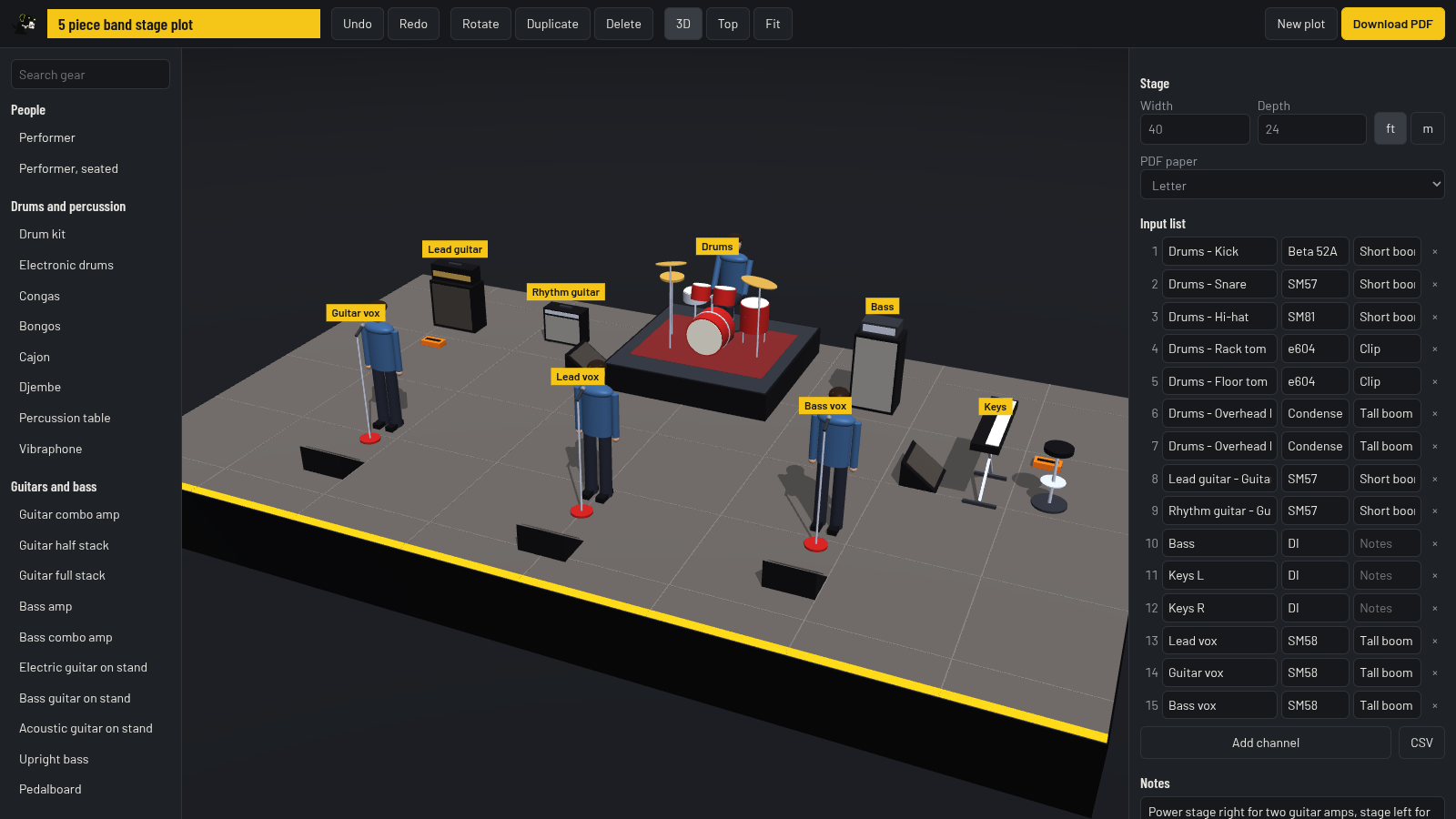
The stage plot editor with a five piece band: drums on a riser, amps, three vocal mics with wedges, and the input list on the right
60pieces of gear, from drum kits and wedges to truss and LED walls
0accounts, emails or installs between you and the PDF
1PDF with the plot, the input list, monitor mixes and your notes

The PDF

What the venue gets

A rider is only useful if the house engineer can read it at the desk, on a phone or off a tired office printer. So the plot is drawn with real lines and real text, not a blurry picture of a 3D scene.

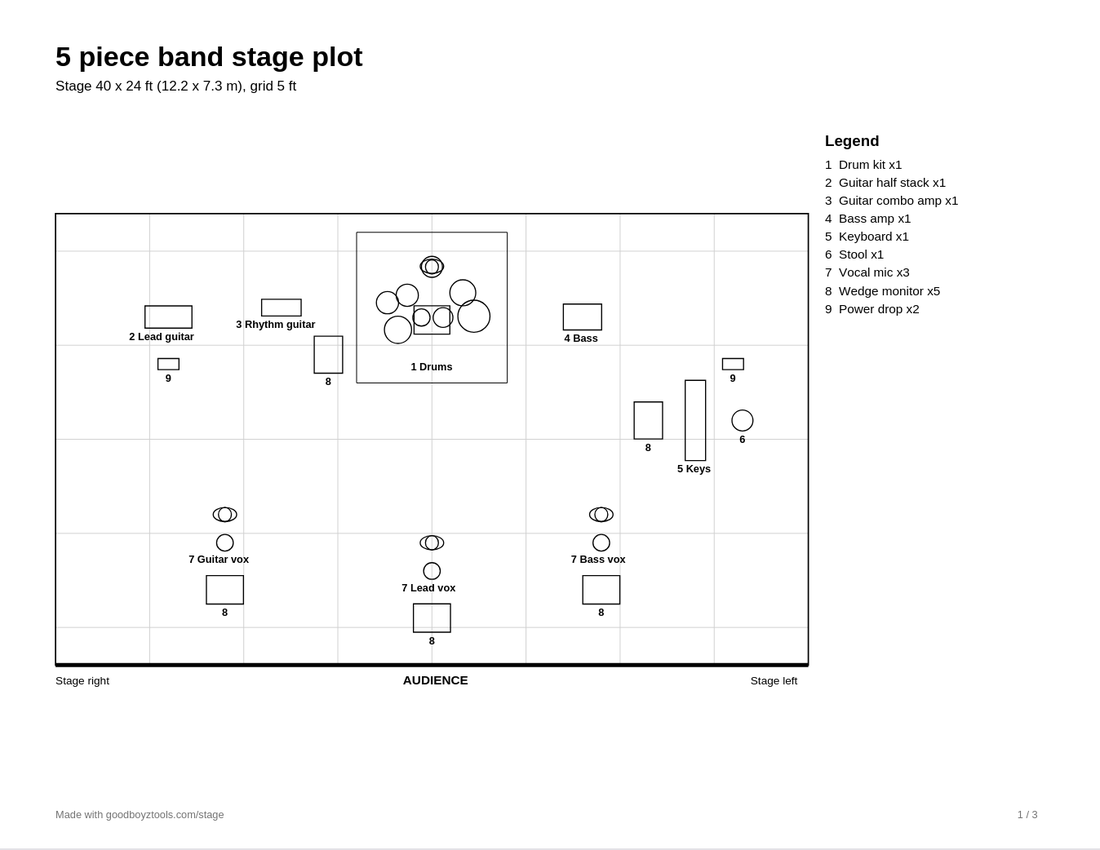
First page of the PDF: the stage seen from above, every item numbered and named, with a legend
The plot from above, with a legend, stage size and a 5 ft grid.
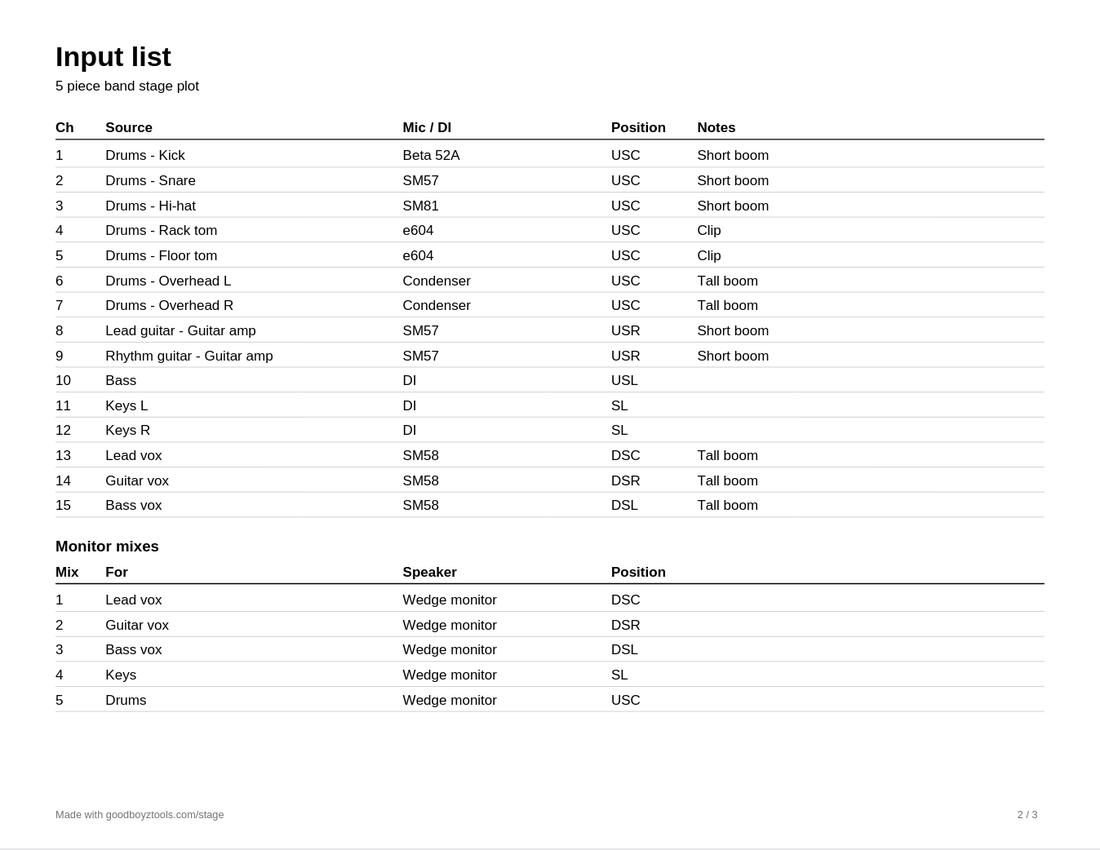
Second page of the PDF: the input list with channel, source, mic, position and notes, then the monitor mixes
Input list and monitor mixes, on as many pages as they need.

Features

The boring parts are done for you

The input list writes itself

Add a drum kit and seven channels appear with the usual mics. Add a keyboard and you get a stereo pair of DIs. Every line stays editable.

Names follow the players

Call a vocal mic "Ana" and her channel is renamed with it. Rename the amp, the channel follows. What you typed by hand is never overwritten.

Every wedge is a mix

Each monitor on the stage becomes a line in the monitor mixes table. Who it is for is worked out from who stands in front of it.

Positions the crew already uses

DSC, USR, SL: each channel carries where its source stands. Move the amp across the stage and the position changes with it.

Selecting works the way you expect

Drag across the floor to grab a group. A click picks the mic, not the riser under it. Zoom goes to where the cursor is.

A full stage stays quick

The whole scene is drawn in a handful of passes, however much gear is on it. Ninety mic stands cost the same as nine.

Feet or meters

Set the stage in the unit you think in. The PDF shows both, because the venue may think in the other one.

Your plot stays on your device

The editor runs in your browser and saves there. Nothing is uploaded and there is no account to make.

Templates

Start from a lineup close to yours

Each one opens in the editor with the gear placed and the input list already filled in.

Pricing

Free does the job. Pro keeps your plots.

Free

$0

  • The full editor and all 60 pieces of gear
  • Input list, monitor mixes, CSV
  • Vector PDF in Letter or A4
  • Saved in your browser, no account

Open the editor

Pro

$5 a month, or $39 a year

  • Everything in Free
  • Up to 100 plots in your account, on any computer
  • A read-only link for each plot to send the venue
  • PDF without our name in the footer

Get Pro yearly or monthly

Cancel anytime. Full refund within 14 days. If you cancel, your saved plots stay yours to open and delete.

How it works

Five steps, about ten minutes

  1. Set the stage size in feet or meters.
  2. Click gear in the list to drop it on the stage, then drag it where it goes.
  3. Name what matters: "Lead vox", "Keys", or the player's name.
  4. Check the input list. Change a mic, add a talkback, delete what you do not use.
  5. Download the PDF and send it with your rider.

Open the editor

Questions

Before you start

Is it really free?
Yes. The editor and the PDF are free and need no account. Pro is for people who want their plots in an account and a link to send the venue.
How do I connect Pro to the editor?
After you subscribe, generate a key on your account page, open the editor, choose Account and paste the key. The key stays in that browser.
What is a stage plot?
A drawing of the stage from above that shows where every player, instrument, amp, mic and monitor goes. Bands send it to the venue with an input list, so the crew can set up before the band arrives.
What goes on an input list?
One line per channel: what the source is, which mic or DI it uses, and where it is on stage. The editor builds this list from the gear you place.
Where is my plot saved?
In this browser, on this device. Nothing is uploaded. Clearing your browser data removes it, so keep the PDF.
Which side is stage left?
Stage left and stage right are from the performer's point of view, facing the audience. On the PDF the audience is at the bottom, so stage left is on the right of the page.
Can I print it in black and white?
The PDF is black lines on white by design. It reads the same on a laser printer, a photocopy or a phone screen.